
By DwellWatt Editorial Team · Reviewed September 13, 2026 · How we research our guides
Cover: AI-generated editorial illustration; not a tested or recommended product.
A smart thermostat connects to Wi-Fi so you can manage your home's heating and cooling from your phone. Depending on the model, it can also follow a schedule, learn your preferences, or adjust settings when you're away. The useful question is not just what it can do. It's whether those features will reduce waste in your home.
Quick answer: A smart thermostat can save money, but it is not a guaranteed discount on your whole utility bill. ENERGY STAR estimates average savings of about 8% of heating and cooling costs, or roughly $50 a year, for certified models. Your result depends on your equipment, climate, comfort needs, and current habits. ENERGY STAR's savings FAQ explains the estimate.
If your current thermostat already follows a sensible schedule, buying a connected replacement may mostly add convenience. If you regularly heat or cool an empty house because nobody remembers to change the settings, automation has a clearer job to do.
What does a smart thermostat actually do?
Think of it as a more flexible control for equipment you already own—not a new furnace or air conditioner. It tells a compatible system when to run and what temperature to maintain.
Common features include app controls, schedules, occupancy detection, and reports on equipment use. Some models learn routines; others rely on schedules you enter. A Wi-Fi connection alone does not mean a device learns your habits. Check the exact feature list. ENERGY STAR's product guide describes these differences.
For example, if a household leaves at 8 a.m. and returns at 5 p.m., a suitable schedule can reduce unnecessary heating or cooling during that gap. Someone working from home may need a different schedule—or little daytime adjustment at all.
Smart vs. programmable vs. manual thermostats
On small screens, swipe the table sideways to see all columns.
| Type | How you use it | Main trade-off |
|---|---|---|
| Manual | Change the setting yourself | Simple, but you must remember routine adjustments |
| Programmable | Set a repeating temperature schedule | Useful for predictable routines without needing app controls |
| Smart | Use schedules plus connected features, depending on model | More flexibility, but compatibility, setup, and ongoing support matter |
The Department of Energy's thermostat training guide distinguishes fixed schedules from controls that respond to occupancy or activity.
The practical takeaway: a well-used programmable thermostat can already handle a regular workweek. Consider what your current controls fail to do before paying to replace them.
How much money could a smart thermostat save?
Start with the annual cost of heating and cooling controlled by that thermostat. Don't apply a savings percentage to refrigerator use, water heating, or fixed utility charges.
If you heat with gas and cool with electricity, relevant savings may appear on two bills. If a thermostat controls only one zone, don't use the heating and cooling costs of the entire property.
Here is a simple planning formula:
Estimated annual energy savings = annual controlled heating and cooling cost × assumed savings rate
The examples below use an 8% assumption. They are calculations, not measured households or promises. The spending amounts are illustrative, not national averages.
On small screens, swipe the table sideways to see all columns.
| Annual heating and cooling cost | Annual savings at 8% | Monthly equivalent |
|---|---|---|
| $600 | $48 | $4 |
| $1,200 | $96 | $8 |
| $2,400 | $192 | $16 |
For the middle example, $1,200 × 0.08 = $96 per year. Dividing by 12 gives $8, but actual savings will vary by season rather than arrive as an equal monthly credit.
Don't know your heating and cooling share? Look for an end-use estimate in your utility account or ask your utility about an energy assessment. Treat an account's estimated breakdown as an estimate, not an appliance meter. If your starting point is unclear, use a range instead of inventing a precise number.
Our guide to why an electric bill is unusually high can help you separate changes in consumption from changes in rates.
Calculate the payback before you buy
The shelf price isn't always the finished cost. Get the total for the thermostat, tax, installation, required power accessories, and any extra room sensors you actually need. Then subtract only rebates you have confirmed you're eligible to receive.
Net installed cost = total purchase and installation cost − confirmed rebates
Simple payback in years = net installed cost ÷ estimated annual net savings
Suppose the net installed cost is $240 and annual heating and cooling spending is $1,200. Those are hypothetical inputs, not a market-price quote. At $96 in annual savings, simple payback is 2.5 years.
Now stress-test the same purchase:
On small screens, swipe the table sideways to see all columns.
| Assumed reduction in heating and cooling cost | Estimated annual savings | Simple payback on $240 |
|---|---|---|
| 0% | $0 | No payback from energy savings |
| 4% | $48 | 5 years |
| 8% | $96 | 2.5 years |
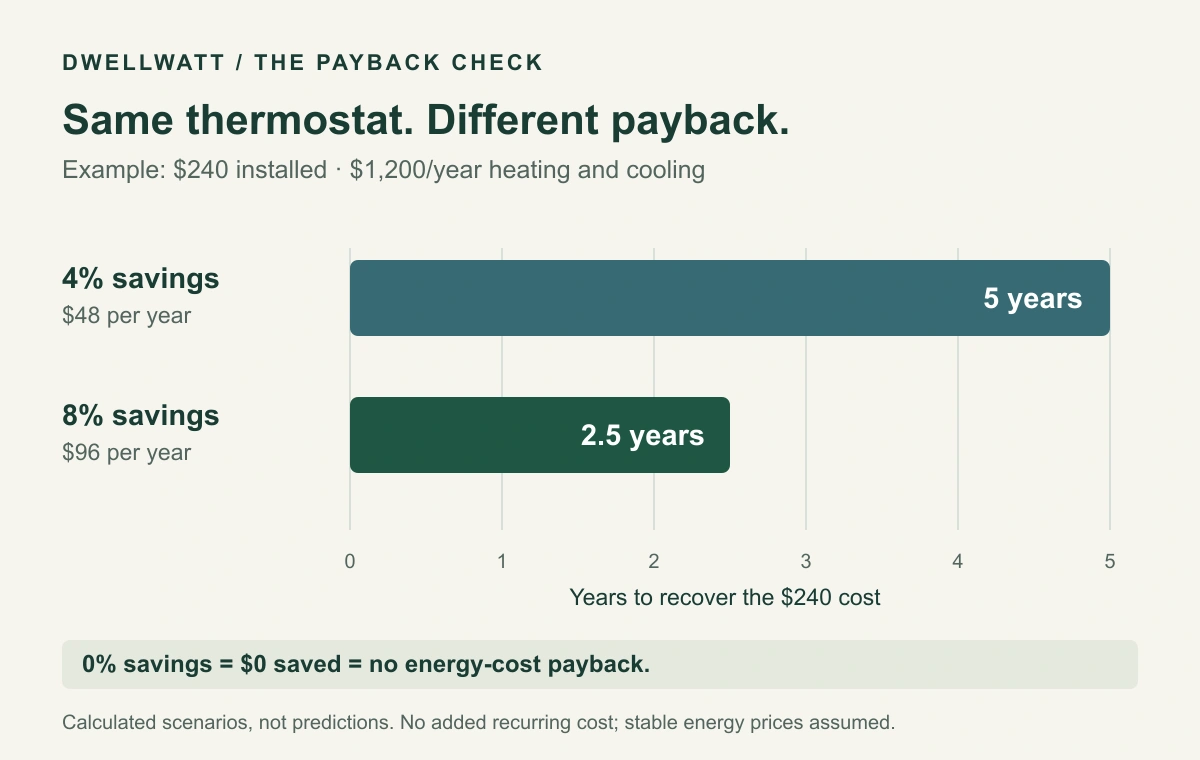
The 0% and 4% cases are deliberately chosen sensitivity checks, not published forecasts. The table assumes stable energy prices and no added recurring cost. For your own calculation, subtract any incremental device electricity or paid-service cost from annual savings. Financing, replacement, and the time value of money are not included in this simple estimate.
If a basic thermostat also needs replacing, compare the extra cost of going smart with the extra benefit. If your existing thermostat works, compare the full upgrade cost with keeping it.
Remote control may still be worth something to you when payback is slow. Just call that convenience, not guaranteed energy savings.
When a smart thermostat is more likely to be worth it
Start with a specific problem it can solve:
- Forgotten adjustments: You regularly leave a fully heated or cooled home empty for long periods.
- An unpredictable routine: App access or reliable occupancy features would help you manage changes.
- A broken or frustrating controller: You already need a replacement and can compare the additional cost.
- A confirmed incentive: A utility rebate lowers the installed price of a compatible model.
It may be a lower priority if your current schedule works, heating and cooling costs are modest, or the installation requires expensive changes. A thermostat also cannot repair a failing system or seal a drafty room. Identify the problem before choosing the product.
Five things to check before ordering
1. Your exact heating and cooling system
Many mainstream smart thermostats are intended for low-voltage systems, but compatibility is model-specific. Electric baseboard heating can use line-voltage controls that are not interchangeable with those devices. Check the manufacturer's compatibility tool before purchase.
For example, Google's Nest compatibility guide distinguishes supported 24-volt systems from incompatible high-voltage and proprietary systems. This is a compatibility example, not a recommendation to choose Nest over another brand.
Do not disconnect wiring to experiment. Have a qualified technician assess uncertain wiring, line-voltage equipment, or complex system controls.
2. Power requirements and installation cost
Some installations need a C wire or an approved power accessory. A C wire provides continuous power to the thermostat. Not every home has one, and requirements differ by thermostat and equipment. Ask for the complete installation quote, including any necessary accessory, before calculating payback.
3. Heat-pump and backup-heat controls
A heat pump needs appropriate setup, particularly if it has electric resistance backup. Large temperature changes during recovery can increase backup use on some systems. DOE recommends thermostats designed to limit unnecessary resistance heating during recovery.
Ask the installer about equipment-specific schedules, recovery settings, and backup operation. Do not disable necessary backup heat to chase savings. Our guide explains what AUX heat means and what it can cost.
4. Comfort, connectivity, and support
Check how schedules account for everyone at home—not just the person whose phone controls an away setting. Keep temperatures appropriate for household members, pets, humidity control, and freeze protection.
Before buying, also check local controls during an internet outage, phone compatibility, privacy options, any paid features, and the manufacturer's support policy. Don't assume a discounted older device will retain every connected feature indefinitely.
For example, Google ended app support and software updates for first- and second-generation Nest Learning Thermostats on October 25, 2025, while retaining on-device temperature and schedule controls. See Google's support-change announcement. Check the exact generation when shopping used.
5. Rebate terms, not just the advertised amount
Use the rebate finder in ENERGY STAR's thermostat guide, then verify eligibility with your utility before purchase. Ask whether an offer requires enrollment in a demand-response program, permits temperature adjustments during events, or has participation conditions.
Keep one-time rebates separate from recurring rewards. Also, a thermostat does not automatically make electricity cheaper at night; that depends on your electricity rate plan.
How to check whether it helps after installation
Save your old schedule and recent energy bills before changing anything. Record the new schedule and installation date, then review comfort and equipment operation during the first few weeks.
For a more meaningful savings check, compare a full heating or cooling season with the corresponding previous season. Account for billing-period length, weather, energy prices, occupancy, and other equipment changes. A mild month after installation is not proof the thermostat caused the difference.
The EIA explains how heating and cooling degree days help compare weather-related energy needs. Your utility may offer a weather-adjusted comparison. Runtime reports can reveal patterns, but runtime alone is not a direct measurement of dollars saved.
Common questions
Will it lower my entire electric bill by 8%?
No. The benchmark concerns heating and cooling costs, not every appliance or charge. Your actual result can be lower, higher, or zero.
Is a smart thermostat worth it if I'm home all day?
Possibly for comfort or remote control, but you may have fewer unoccupied hours to adjust. Base the purchase on your routine and a conservative savings estimate.
Can renters install one?
Ask the property owner or manager before changing installed controls. Confirm permission, equipment compatibility, who pays, and whether you can take the device when you move.
What should I do before spending money?
Check the schedule on your current thermostat. If it already meets your comfort needs without unnecessary operation, an upgrade may be optional. If it doesn't, identify the missing feature, verify compatibility, and calculate payback using the installed cost.
Bottom line: The best smart thermostat for your home is one that works with your equipment and solves a real control problem. Start there—not with the biggest savings claim on the box.
By DwellWatt Editorial Team. Reviewed September 13, 2026. This is a research-based guide, not a hands-on product test. Calculations use stated assumptions; no household result is guaranteed. Follow equipment instructions and use qualified help for installation. See our Editorial Policy and Disclaimer.